How to Use SMG Real Estate APIs
Introduction to the SMG Real Estate APIs
SMG Real Estate provides access to select RESTful APIs for Professional and Expert package customers.
Currently SMG offers 2 API endpoints, allowing customers to fetch:
- their listed properties published on the SMG platforms, and
- the contact requests for each published property.
See details for each of them below. More APIs may be added in the future, if the customer need for them arises.
We encourage customers who need other API functionality to contact their account manager.
⚠️ Disclaimer
These initial API versions may evolve based on customer feedback and use cases. Customers acknowledge that future changes could impact their integrations, potentially requiring adjustments on their end.
Setting Up
SMG Real Estate uses API keys to authenticate and authorize access to the APIs.
To start using the APIs, you need to request access by contacting your account manager. Once enrolled, you will receive a secret API key, which allows access to data associated with your enrolled agencies (defined by one or multiple Agency IDs).
To authenticate and authorise API requests, include the API Key in the Authorization header of your HTTP requests in
this format: Authorization: ApiKey <YOUR_API_KEY> .
Note that we are not using a Bearer Token but an API key in the UUID format and this is reflected in the header value as
such.
Example of an Authorization header in cURL:
curl -H "Authorization: ApiKey <YOUR_API_KEY>" https://api.re.swissmarketplace.group/
⚠️ Security Warning: Treat your API key like a password. Do not share it or expose it publicly.
Available API Actions
Our user-facing applications rely on various backend services, each with specialised APIs. Some of these APIs are now available for customer use. Below, we explain what you can do with the available endpoints.
Retrieve Listed Properties
The Get Insertions endpoint can search and fetch properties that have been posted to the
SMG Real Estate platform. The endpoint requires an agencyId and can take some filter parameters
and returns a paginated list of properties that belong to the agency and match the filter
criteria.
ℹ Note: API keys are linked to specific
agencyIds. It is possible to have different API keys for different agencies. It is also possible that an API key maybe authorized for one agency but not for another.
Endpoint:
GET /insertion-funnel/integration/{agencyId}/insertions
Get Insertions API endpoint documentation
Example Requests
-
Fetch 30 properties for agency "h123":
curl --location 'https://api.re.swissmarketplace.group/insertion-funnel/integration/h123/insertions?pageSize=30&page=1' \
--header 'Authorization: ApiKey <YOUR_API_KEY>' -
Fetch 10
publishedrentalTopListingproperties of agency "h123".curl --location 'https://api.re.swissmarketplace.group/insertion-funnel/integration/h123/insertions?pageSize=10&offerType=RENT&rankType=TOP' \
--header 'Authorization: ApiKey <YOUR_API_KEY>' -
Fetch the first 20 properties of agency "h123" with the postal code 8003.
curl --location 'https://api.re.swissmarketplace.group/insertion-funnel/integration/h123/insertions?pageSize=20&searchQuery=8003' \
--header 'Authorization: ApiKey <YOUR_API_KEY>'
Retrieve Contact Requests
The Get Contact Requests endpoint allows retrieving contact requests for a single listing,
provided you have access to the agency the property belongs to, and the propertyReferenceId of said published property.
The propertyReferenceId can be retrieved with the the Get Insertions API endpoint, also
explained above.
Endpoint:
GET /ubm-contact-request/property/{propertyReferenceId}
Get Contact Requests API endpoint documentation
⚠️ Important: The
propertyReferenceIdmust be URI encoded when used in API requests. Special characters like '#' need to be properly escaped to ensure correct request handling.#→%23
Example Requests
-
Fetch 20 contact requests for a property with
propertyReferenceId="h123#8003#01#00001"sortedby highest score first.curl --location 'https://api.re.swissmarketplace.group/ubm-contact-request/property/h123%238003%2301%2300001?numberOfItemsPerPage=20&sortBy=score&sortOrder=desc' \
--header 'Authorization: ApiKey <YOUR_API_KEY>' -
Fetch 10 contact requests for the same property,
sortedby theoldestfirst.curl --location 'https://api.re.swissmarketplace.group/ubm-contact-request/h123%238003%2301%2300001?numberOfItemsPerPage=10&sortBy=createdAt&sortOrder=asc' \
--header 'Authorization: ApiKey <YOUR_API_KEY>'
Error handling
The most common API errors encountered when working with our endpoints are authentication and authorisation related. These typically manifest in three main scenarios:
- Invalid API Key: When the provided API key is incorrect, expired, or malformed, the API will return a 403 Forbidden error. Always ensure you're using the correct API key format in the Authorization header.
- Wrong Agency ID: If you provide an agency ID in the url of your request that doesn't exist in our system or you have no permission to access, you'll receive a 403 Forbidden error. Double-check that you're using the correct agency identifier in your requests.
- Agency Access not configured: When attempting to access data for an agency that isn't registered to your API key, you'll receive a 403 Forbidden error. Each API key is specifically linked to certain agencies, and you can only access data for those registered agencies. If you want to authorise more agency IDs to be used with your API key, please contact us.
For other errors please consult the OpenApi documentation.
FAQ
-
I want to create new listings through the API. Is that possible?
It’s possible to create new listings programmatically in 2 ways:
- through FTP in the IDX format (contact our support team to get more information and access credentials)
- through a REST API in the SwissRETS format (newly supported, currently in the pilot phase) - contact mihaly.keserue@swissmarketplace.group for more information
-
What is my
agencyId?Your agencyId is a unique identifier assigned to your agency by SMG Real Estate. It typically starts with a letter followed by numbers (e.g., “h123”). You can find this ID in your SMG Real Estate Business Manager account.
-
Where can I request an API key?
Contact your account manager.
-
Where can I find the object reference?
The object reference (
propertyReferenceId) is a unique identifier for each listing. You can find it in the Detail Page of your listing when viewing it in UBM, or in the export data from your CRM system.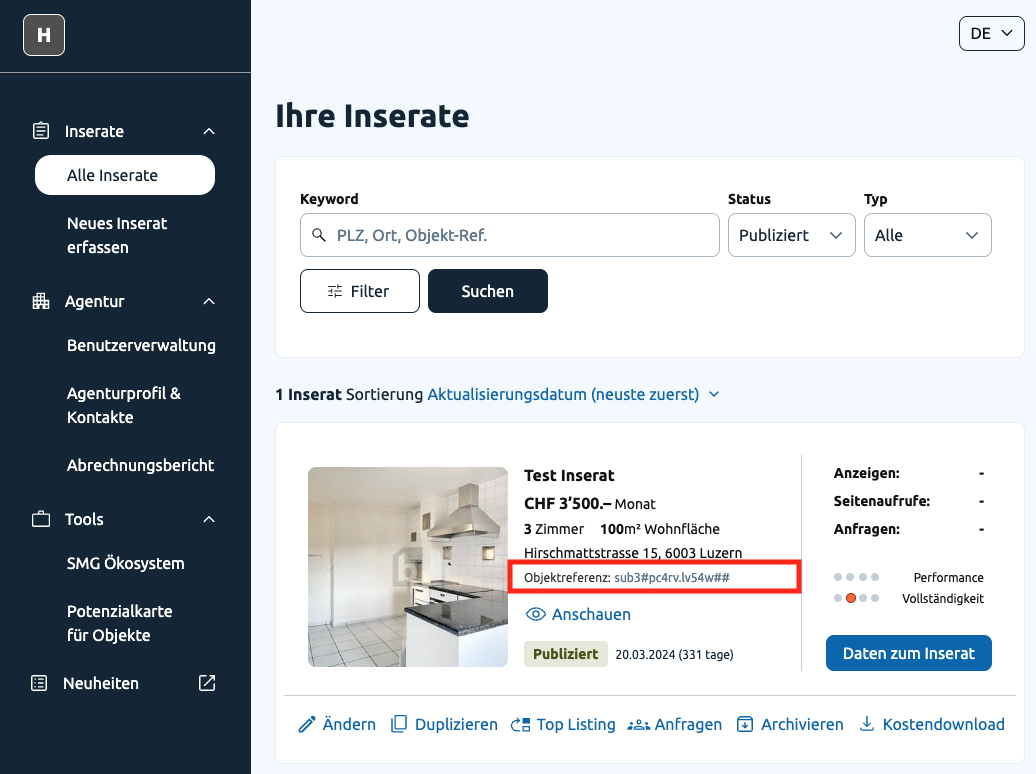
The Format typically follows a pattern of:
refAgency01#refProperty01#refHouse01#refObj01Sometimes also referred to as “objectReference”.Here are some examples of property reference IDs:
h123#8003#01#00001
h123#1204#02#00023
h987#vfte2.7addu##
h987#b6cy3.c2k57## -
What are the rate limits?
At this point in time we do not have any rate limits or API usage quotas. This might change in the future as we adapt to the usage of our exposed APIs.
Glossary
-
Insertion, Listing, Property: In this documentation they can be used interchangeably and represent an individual property created by the Agency.
-
Contact Request: An inquiry from a potential buyer/renter about a listing.
-
Customer: An entity that has a contract with SMG Real Estate can have one or multiple agencies through which it publishes properties.
-
Agency, Lister: An entity that publishes properties on SMG platforms.
ℹ Note: Even though there is a difference between Agency, Lister and Customer; the identifiers
customerId,agencyId, andlisterIdare used interchangeably in this documentation. -
Account: An account in UBM represents a login that provides access to one or more agencies. Accounts can create insertions, view listing data, and manage other accounts for shared agencies.